No Download
Play Meccha Chameleon online straight in your browser. No installer, no Steam client, and no waiting for a large package to finish.
Prepare, blend in, survive the hunt.
Meccha Chameleon Online is a free browser hide-and-seek game inspired by the camouflage fantasy of MECCHA CHAMELEON. You play a color-shifting chameleon trapped in a colorful room with a hunter on patrol. There is no account, no app store install, and no launcher — open the page and play instantly on PC or mobile. Whether you have a few minutes between tasks or want a longer stealth challenge, the browser keeps setup out of the way so you can focus on hiding.
The core loop is simple and tense. Each match opens with a short prepare phase to find cover and blend in, then the hunt begins. Move with the keyboard or a virtual joystick, press E (or the SAMPLE button on mobile) to take a prop's color on purpose, and freeze when the hunter looks your way. A soft nearby assist still tints you toward the closest prop, but the intentional sample is the main verb. Matching color alone is not enough; staying still raises your camouflage score so the hunter can walk right past without spotting you. Move too soon and the score drops — you become an easy target. Learn the patrol routes, pick safer corners, and decide when a bold dash is worth the risk.
This browser version is built for quick sessions: ninety seconds on the clock, voxel-style 3D, and one clear goal — survive until time runs out. If you want a free Meccha Chameleon experience online with no download, this site is ready when you are. Share the link, play on the go, and try again after every close call.
Meccha Chameleon Online is designed for players who want the feel of a camouflage hide-and-seek game without installing a full PC release first. The match starts quickly, the rules are visible in the HUD, and every round teaches a useful habit: choose cover early, sample a nearby color, stop moving when danger is close, then move again only when the hunter has passed. That makes the browser version easy to understand even if you have never played this type of stealth game before.
Because the game runs directly on the page, it also works well as a quick mobile or school-browser style session. You can test the hiding loop, learn how camouflage changes with movement, and replay instantly after a failed run. The goal is to give searchers a real Meccha Chameleon Online experience instead of a blank article page, a download wall, or a slow redirect.
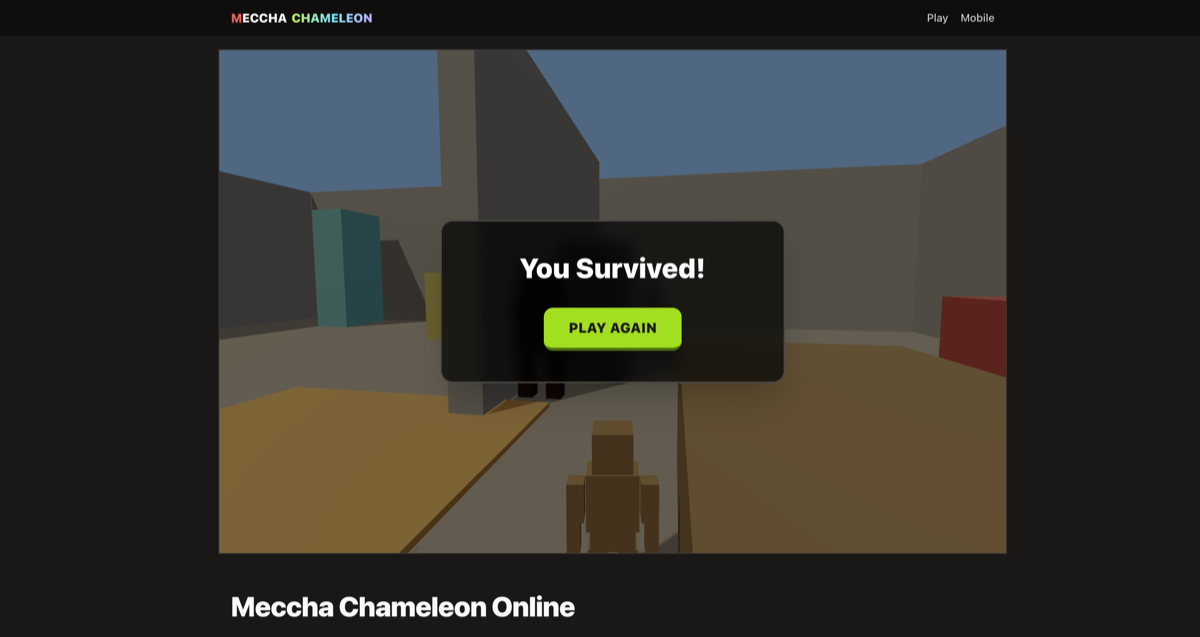
The screenshot shows the main play view: a third-person chameleon, colorful hiding props, a countdown timer, and a camouflage meter. The meter matters because the hunter does not only check your position. It also reacts to how well you match the room and how still you stay.
For the best first run, use the prepare phase to find a prop with a strong color, sample it, and freeze before the hunt begins. Once the hunter walks away, rotate carefully and move to the next cover. This simple loop keeps the online game readable while still giving you a reason to replay and improve your route.
Step 1
Use WASD or arrow keys on desktop. On phones and tablets, drag the on-screen joystick to walk. Stay aware of the hunter’s path while you scout safe props.
Step 2
Press E (desktop) or the SAMPLE button (mobile) while facing a prop. Your chameleon takes that prop's color and blends in over about a second. A soft assist still tints you toward nearby props, but the sample is the primary verb — pick the right corner on purpose.
Step 3
Matching color is only half the trick. Hold still to raise your camouflage meter. When it is high enough, the hunter will not detect you even if you are in their view cone.
Step 4
You win by lasting the full timer without being caught. If the hunter touches you, the run ends — hit Play Again and try a better route.
Step 5
Click the game to capture the mouse, move it to turn, and hold Ctrl to crouch.
Want more detail on controls, camouflage, and match phases? Read the full How to Play Meccha Chameleon guide.
Phone-first layout with a virtual joystick and SAMPLE button. Meccha Chameleon Mobile
Desktop and touch controls, camouflage, Prepare vs Hunt, and survival tips. How to Play Meccha Chameleon
Want the official paid PC release? See the honest Steam download guide. Meccha Chameleon Download
Play Meccha Chameleon online straight in your browser. No installer, no Steam client, and no waiting for a large package to finish.
This browser game is free to play. Jump into a round whenever you want without a paid gate for the basic experience.
Touch controls and a virtual joystick make short sessions easy on Android and iOS browsers, with the same hide-and-seek loop as desktop.
A chunky room, bright props, and a clear hunter silhouette keep the camouflage game readable at a glance on any screen size.
Yes. This browser version of Meccha Chameleon is free to play online. You can start a round without paying or creating an account.
Absolutely. Meccha Chameleon Online runs in your web browser — no download, no app install, and no launcher required.
Yes. The game works in modern mobile browsers on Android and iOS. Use the virtual joystick to move, and visit the Mobile page for phone-first tips.
The paid release is separate from this page. Meccha Chameleon Online is a quick browser version for players who want instant web play before deciding whether to install a full version elsewhere.
Survive for ninety seconds without being touched by the hunter. When the timer hits zero, you win. Getting caught ends the run immediately.
Stand near an object to take on its color, then stay still so your camouflage score rises. With a high enough score, the hunter will not detect you even inside their vision cone. Moving lowers camouflage and makes you easier to spot.
No. This is an unofficial browser game inspired by the camouflage idea. For the paid release, check the official store listing.