Prepare, blend in, survive the hunt.
Meccha Chameleon Mobile
Play Meccha Chameleon Mobile in Your Browser
Meccha Chameleon Mobile is made for players who want a quick camouflage hide-and-seek game on a phone or tablet without installing an app. Open the page in Chrome, Safari, or another modern browser, tap Play, and the game loads directly on the screen. The mobile version keeps the same core loop as desktop: find cover, sample a nearby color, stay still to raise camouflage, and survive until the timer runs out.
Touch controls are built around short sessions. Use the virtual joystick to walk and turn, then tap the SAMPLE button when you are facing a prop. Sampling is important because it lets your chameleon take a color on purpose instead of relying only on nearby objects. After sampling, stop moving for a moment so the camouflage meter can climb before the hunter gets close.
No APK, no iOS install, and no extra account are required. Each round opens with a short prepare phase to find cover and blend in, then the hunt begins. Hide behind colorful props, freeze when the hunter looks your way, and try to last the full ninety seconds. It is the same hide-and-seek loop as desktop, tuned so mobile players can restart fast and learn better routes after every run.
Meccha Chameleon Mobile Gameplay
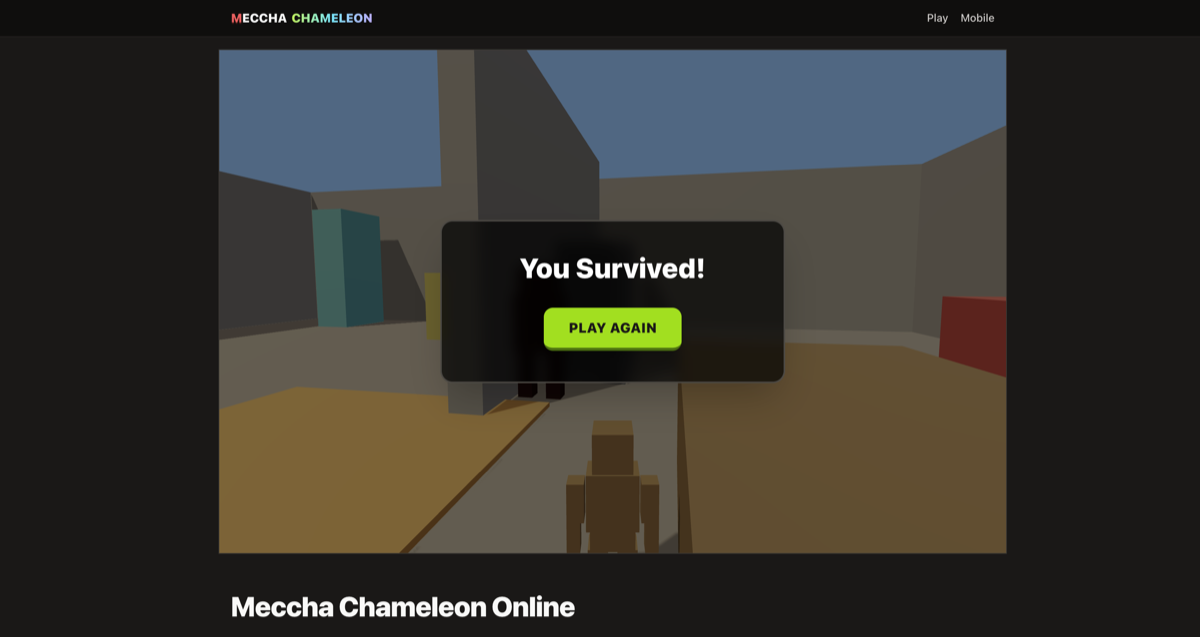
The mobile game screen keeps the important information visible: the timer, the camouflage meter, the current sampled color, and the play field. On a small screen, that clarity matters more than extra decoration. You should always know whether you are hidden, whether the hunter is close, and whether it is safe to move.
For the best first run, use the prepare phase to pick a prop color before the hunter becomes dangerous. Tap SAMPLE while facing a nearby object, let the color blend in, then stop moving to build camouflage. Once the hunter passes, move to the next piece of cover and repeat the loop.
Meccha Chameleon Mobile Controls
The virtual joystick handles movement on Android, iPhone, and iPad. Drag gently for small adjustments when you are near cover, or push farther when you need to cross open space. The SAMPLE button is the main mobile action: face a prop, tap once, and your chameleon starts blending toward that color.
Mobile play rewards patience. Moving lowers your camouflage, so the safest habit is to sample, freeze, watch the hunter, and only move when the path is clear. If the meter is low, do not panic-tap controls. Find the closest matching object, stop beside it, and let the camouflage score recover before making another dash.
Android and iPhone Tips
On Android, Chrome usually gives the smoothest Meccha Chameleon Mobile experience. On iPhone and iPad, Safari is the safest choice because it has strong WebGL support and stable touch handling. If the game feels cramped, rotate the device, close extra tabs, or reload the page before starting a new match.
A modern browser is required because the game uses real-time 3D rendering. You do not need a controller, a login, or a large download. Keep battery saver off during play if your phone aggressively limits browser performance, and use a stable connection so the page assets load quickly before the first round.
Meccha Chameleon Mobile vs App Download
The biggest advantage of Meccha Chameleon Mobile is instant access. A normal app download means finding the right store page, waiting for installation, and giving the app storage space. This browser version removes that setup and lets you test the camouflage loop immediately.
The page is not trying to replace a full paid release. It is built for fast online play: one readable room, simple touch controls, a clear hunter threat, and quick restarts. That makes it a better match for mobile searchers than a generic article, a download wall, or a page that sends you somewhere else before you can play.
Steam vs This Site
| Feature | Steam | This site |
|---|---|---|
| Price | Paid (official product) | Free to play |
| Install | Download via Steam / client | Instant in the browser |
| Platforms | PC-focused (official release) | PC, Android, and iOS browsers |
| Affiliation | Official MECCHA CHAMELEON | Unofficial browser version |
FAQ
Can I play Meccha Chameleon Mobile on Android or iPhone?
Yes. Open this site in a modern mobile browser — no app download required. Use the virtual joystick to move and hide from the hunter.
Can I play Meccha Chameleon Mobile without an app?
Yes. Meccha Chameleon Mobile runs entirely in the browser, so you do not need an APK, App Store download, account, or launcher. Bookmark the page and play anytime without using storage for an install.
What is the best browser for Meccha Chameleon Mobile?
Chrome on Android and Safari on iPhone are the safest choices. A modern browser with WebGL support is required for the 3D game.
How is this different from the Steam game?
The paid release is separate from this page. This mobile page is an unofficial browser version for quick online sessions on phones and tablets.
What controls work on touch screens?
A virtual joystick appears for touch play. Drag to move, tap the SAMPLE button while facing a prop to take its color on purpose, and stay still to raise camouflage before the hunter spots you.
Ready for a full session? Jump back to the main game.
Play Meccha Chameleon Online